
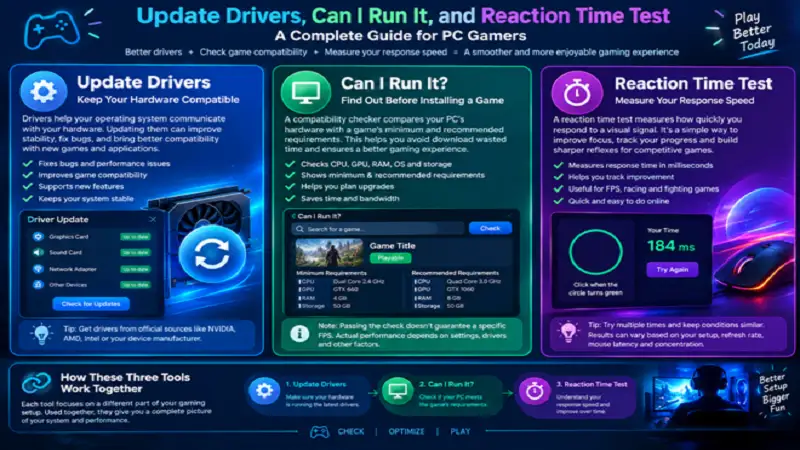
A good gaming experience depends on more than having an expensive computer or a high-end graphics card. Software compatibility, hardware condition, and personal responsiveness all affect how games feel and perform. Before spending money on upgrades or changing your gaming setup, it is useful to understand these different factors.
Three helpful areas to explore are update drivers, Can I Run It, and reaction time test tools. Each provides different information that can help gamers improve their experience and make more informed decisions.
Update Drivers: Keep Your Hardware Compatible
Drivers act as communication software between Windows and the physical components installed inside a computer. Without suitable drivers, devices such as graphics cards, sound adapters, network controllers, and other hardware may not function as expected.
When you update drivers, you can receive important fixes, improved compatibility, and support for newer applications or games. Graphics driver updates are particularly relevant to gamers because manufacturers regularly release versions addressing game-related bugs and performance issues.
For example, someone experiencing graphical glitches or unexpected crashes in a newly released game may benefit from checking whether a compatible graphics driver update is available.
Windows Device Manager can help identify installed hardware and manage certain driver updates. Alternatively, users can visit the official websites of NVIDIA, AMD, Intel, or their computer manufacturer to obtain the appropriate software.
One thing worth remembering is that newer drivers do not automatically make every computer faster. Their main benefits may include stability, compatibility, and support for particular applications. Always select drivers that match your exact hardware and operating system.
Can I Run It? Find Out Before Installing a Game
Imagine discovering an interesting PC game, downloading several gigabytes of files, and then finding out that your graphics card cannot handle it properly. Checking compatibility beforehand can help avoid this situation.
The question Can I Run It refers to determining whether a computer has the necessary specifications to run a particular game.
Compatibility-checking tools compare available hardware information against a game’s published minimum and recommended requirements. Common specifications include the processor, graphics card, RAM, operating system, and storage capacity.
The Can You RUN It website is one example of a service that helps users compare their computers with supported games. Users can explore game requirements and assess whether their systems meet the listed hardware specifications.
Minimum requirements indicate the basic configuration needed to run a title, while recommended requirements describe a more capable setup. However, passing a compatibility check does not guarantee a particular FPS or graphics quality.
Game performance can still vary depending on resolution, driver versions, cooling, background applications, and individual graphics settings.
Reaction Time Test: Measure Your Response Speed
Gaming performance is not determined entirely by computer hardware. In competitive games, the player’s ability to recognize an event and respond quickly can also influence the outcome.
A reaction time test measures the interval between a signal appearing and a person’s response. Most online versions use a simple visual activity: users wait for a color or indicator to change and click as quickly as possible.
The result is generally displayed in milliseconds. This makes it possible to compare different attempts and observe changes in personal response speed.
Reaction testing can be interesting for players of shooting games, racing titles, fighting games, and other competitive genres. It provides a straightforward way to practice paying attention to visual signals.
However, online results are affected by several variables. Monitor refresh rate, mouse latency, browser performance, concentration, and tiredness can all influence the recorded time. Taking multiple attempts under similar conditions provides a more meaningful comparison than relying on one unusually fast result.
How These Three Tools Support Better Gaming
Although these tools measure different things, they can be useful during the same gaming preparation process.
First, check your graphics and other essential drivers to ensure that the hardware is using suitable software. Afterward, use a Can I Run It tool to compare your PC’s hardware with the game’s system requirements and determine whether it can handle the title.
Once the game is running properly, a reaction time test can provide an additional way to evaluate your personal responsiveness.
This combination offers a broader understanding of gaming readiness. It considers software compatibility, computer capabilities, and the human element rather than focusing exclusively on hardware specifications.
Conclusion
The update drivers, Can I Run It, and reaction time test tools each serve a different purpose for PC users. Driver maintenance helps keep hardware compatible, game compatibility checks identify whether a computer meets specific requirements, and reaction testing measures personal response speed.
Using these resources together can help gamers prepare their systems, avoid unnecessary software or hardware purchases, and better understand their gaming performance. A little preparation before starting a new game can make the entire experience more enjoyable. See more topics on Playbattlesquare!